1Zone
EventistaEntertainment
3.22.00 Reviews
- Version
- 2.6.1
- Installs
- 500.00K
- Age Rating
- Everyone
Screenshots
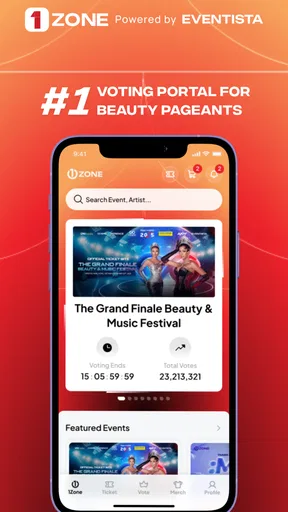
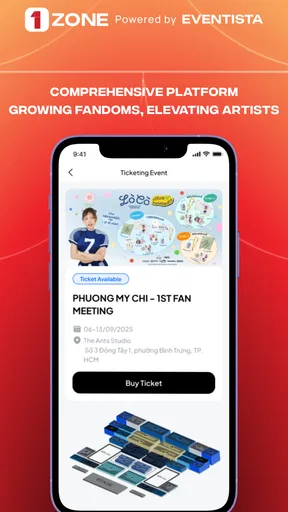
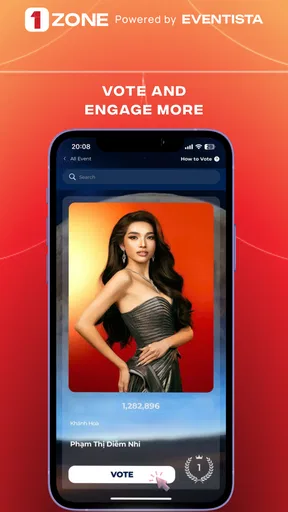
Our Review of 1Zone
 Analysis by Appyee
I approached 1Zone as an entertainment app for people who want a more direct connection with fan-focused experiences. Its store summary points to fan engagement, while the short description simply identifies it as “1Zone,” so the useful question is not whether it replaces every social or media app, but whether it gives you a practical place to follow and interact with entertainment-related activity. After spending time with it, I see a focused tool rather than an all-purpose platform.
The app is free to use, carries an Everyone age rating, and comes from Eventista. It is available for Android devices running version 7.0 or later. That makes the technical entry point fairly broad, although the quality of your experience will depend more on what content or event activity is available to you than on the basic installation itself.
My overall impression is mixed in a useful way. 1Zone can make sense when you already have a reason to engage with a particular entertainment community or event. It is less convincing if you are looking for a large, constantly refreshed catalog of videos, a general-purpose social network, or a polished replacement for the familiar apps you already use every day.
How I built a useful everyday workflow
The best way to use 1Zone is to begin with a specific purpose. Instead of opening it casually and expecting it to entertain you indefinitely, I would start by asking what I want from the app: checking fan-related activity, keeping up with an entertainment experience, or returning to a community interaction that matters to me. That simple decision prevents the app from feeling vague.
My baseline routine would be short and repeatable. I would open the app when I have a clear reason, look through the available area relevant to my interest, spend time on the current engagement, and then leave rather than treating it like an endless feed. This approach suits 1Zone better than aimless browsing because its value appears tied to participation and context.
A realistic example would be someone preparing for an entertainment event. Before leaving home, I would use 1Zone to check the material or engagement connected with that experience. During a break, I would return to it for a quick update or interaction. Later, I would open it again when I have enough time to explore rather than repeatedly checking without a clear goal. The habit is simple, but it keeps the app from competing unnecessarily with messaging, video, and social platforms.
That workflow also helps answer an important question: is 1Zone useful without a strong interest in a particular event or entertainment community? In my view, it is much less compelling then. The app’s purpose is narrow enough that a user needs a reason to return. If you only want general entertainment, a video service or broad social platform will probably offer more variety with less effort.
I would also treat the app as a companion rather than the main destination. If I am already following an entertainment activity elsewhere, 1Zone can be one additional place to check. I would not automatically move every conversation, update, or media habit into it. The advantage comes from using it for the engagement it is designed to support, not from forcing it to become a universal hub.
Settings worth checking before settling into a routine
One of my first recommendations is to spend a moment reviewing the available in-app options before using 1Zone regularly. I would look for controls related to notifications, account behavior, content presentation, and any preferences that affect how often the app interrupts me. Even when an app is easy to understand, small defaults can determine whether it feels helpful or distracting.
I would not switch everything on immediately. A better approach is to begin with the minimum level of alerts needed for the activity you actually care about. If a notification is useful because it tells you when something relevant has changed, keep it. If it merely encourages repeated checking without adding information, turn it down or off where the app allows that choice. This is especially important for an entertainment app, since convenience can quickly become noise.
Another practical check is the way the app handles your starting point. If 1Zone opens to a general area rather than the specific content you want, create a personal habit around reaching your preferred section first. I would pay attention to which screen gives me the clearest overview and use that as my entry point each time. This is not glamorous, but it reduces wasted taps and makes the app feel more intentional.
I would also review whether the app’s presentation is comfortable on your device. Older Android support is helpful, but compatibility does not guarantee the same visual experience on every phone. If text, controls, or media feel cramped, changing the device’s display settings or using a larger screen may help. I would avoid judging the whole service after a rushed first session on a small display.
There is a useful trade-off here. A more personalized setup can make repeat visits faster, but it may also narrow what you notice. I prefer to keep one deliberate check for broader activity rather than entering the same area every time and missing something outside my usual interest. That balance is more valuable than trying to optimize every second.
Because 1Zone is rated for Everyone, it may be approachable for a wide audience, including families. Still, I would explain the app’s purpose to younger users instead of assuming the age label tells them how to use it. The rating describes suitability, not whether the experience will be interesting or whether every feature will be equally easy to understand.
Faster patterns for people who return often
Experienced use of 1Zone comes from repetition, not from hunting for imaginary secret functions. I would build a small routine around the actions I perform most often. Open the app with a clear objective, go directly to the relevant engagement area, complete the check, and exit when there is nothing more useful to do. That pattern makes the app feel lighter.
If I were using it around a recurring entertainment activity, I would separate my visits into three types. A quick check would be for time-sensitive information or a brief return. A participation session would be for interacting more fully. A review session would happen afterward, when I have enough attention to look back at what I missed. Keeping those purposes separate stops every visit from becoming an unfocused scroll.
I would also use a simple personal note outside the app if I needed to remember where I left off. That may sound basic, but it is more reliable than repeatedly exploring the same screens. Since I do not want to invent a special bookmarking system that may not exist, the safest advanced habit is to make my own repeatable process: remember the relevant section, use the same entry route, and check only what has changed.
Another useful pattern is to avoid opening 1Zone immediately whenever I receive a prompt or remember an event. I would group non-urgent checks into one visit. This reduces interruption and gives me a better chance of understanding the full context instead of reacting to isolated pieces. For urgent activity, I would respond promptly; for everything else, batching is more comfortable.
There is also a social consideration. Fan engagement works best when I know what kind of participation I want. If I am there to observe, I should not expect the same experience as someone who wants to interact actively. If I am participating, I should allow enough time to understand the conversation or activity rather than tapping through it quickly. 1Zone is more rewarding when the user’s intention matches the pace of the content.
Compared with a general social network, this focused approach can feel calmer because I am not necessarily mixing entertainment engagement with every other part of my online life. Compared with a video platform, however, it may feel less immediately rewarding if I expect a continuous stream of polished content. Compared with a messaging app, it may not be the best place for private, direct conversation. Its strength is the focused fan context, not breadth.
Where the experience becomes less convincing
The main limitation I felt is that a focused engagement app depends heavily on having relevant activity available. If there is no event, community, or entertainment subject that matches my interests, the app has less to offer than broader alternatives. That is not necessarily a flaw in the concept, but it does make the download harder to justify for casual users.
I would also be cautious about expecting 1Zone to replace established entertainment services. A streaming app is usually better for watching a large range of content. A social network is usually better for discovering unrelated conversations. A dedicated event service may be better when the priority is schedules, tickets, or logistics. I would choose 1Zone when fan engagement is the central need, not simply because it is free.
The public response is another reason to keep expectations measured. The app has an average rating of 3.2 from around eight hundred ratings, with a small number of written reviews shown alongside that score. I read that as a signal to test the app in my own situation rather than assuming it will work equally well for everyone. A middling rating does not settle the question, but it does argue against installing it without a clear use case.
Its reach is still notable: 1Zone has passed half a million installs. That suggests the concept has attracted a meaningful audience, but popularity alone does not tell me whether it fits my event, device, or preferred style of participation. I would treat the install figure as evidence of interest, not as a guarantee of a busy experience for every user.
The current release is version 2.6.1, and the app was released on May 4, 2025. Those details matter when troubleshooting or comparing experiences with another user, because two people may not be looking at the same release history. I would keep the app updated through the normal store process, especially if a feature behaves differently after installation.
Another limitation is psychological rather than technical. Fan-focused apps can encourage a user to check more often than necessary, particularly when the subject is emotionally important. My solution would be to define a stopping point before opening the app. For example, I might check the relevant activity, respond to what needs attention, and leave. Without that boundary, even a small engagement app can become another source of background distraction.
Who should use it, and who should skip it?
I would recommend 1Zone to someone who already has a concrete connection to the entertainment experience it supports. That person is likely to understand the app quickly because the purpose is clear. It may also suit users who prefer keeping fan engagement separate from their main social accounts and who appreciate returning to one focused place instead of searching through a noisy general feed.
I would be more hesitant to recommend it to someone who wants instant entertainment with no setup or context. If your ideal app opens into a broad selection of videos, music, news, or casual content, 1Zone may feel too specialized. I would also skip it if I need a full event-management tool, a private chat replacement, or a comprehensive media library.
Families can consider it because the content rating is Everyone, but I would still guide first-time users through the purpose and basic routine. For an older Android phone, the minimum operating-system requirement is accessible, yet I would judge performance on the actual device rather than assuming every phone will feel equally responsive.
The price is another clear advantage: there is no purchase cost to try it. That lowers the risk of testing it around a specific entertainment activity. Still, “free” does not mean it deserves a permanent place on my phone. After a few purposeful sessions, I would ask whether it saves time, improves engagement, or gives me access to something I cannot get as conveniently elsewhere.
My verdict after using it with a deliberate habit
1Zone is easiest to appreciate when I stop treating it like a general entertainment catalog and use it as a focused fan-engagement companion. Its best qualities are its clear niche, accessible price, broad Android compatibility, and suitability for people who want a dedicated place connected to an entertainment experience. The app becomes more useful when I combine a sensible notification setup with a repeatable entry routine and a clear stopping point.
At the same time, I would not recommend it automatically to every entertainment fan. Its usefulness depends on relevance, and broader alternatives remain better for general discovery, streaming, private communication, or event logistics. The moderate user rating reinforces my preference for trying it in the exact context where I expect to use it, rather than judging it as a universal platform.
My final recommendation is therefore conditional but positive. If you have a specific reason to engage with the community or activity connected to Eventista’s app, the free download is worth testing. Give it a defined job, check the settings before allowing frequent interruptions, and build your own quick workflow instead of searching for features that are not part of its stated role. 1Zone works best as a purposeful companion, not as an app you open simply because you have nothing else to do.
Verdict
Strengths of 1Zone
- Clean interface makes browsing channels quick and straightforward.
- Supports live sports coverage in one convenient place.
- Channel listings help users find available content more easily.
- Works well for casual viewing without complicated setup.
- Useful option for users seeking varied international programming.
Limitations of 1Zone
- Content availability can vary depending on location and licensing.
- Some streams may be unstable during popular live events.
- Video quality may depend heavily on your internet connection.
- The app may include advertising during navigation or playback.
- Not every channel or program is guaranteed to remain available.
Similar Picks in This Category
View All
Google Play Games
Google LLC3.9

Netflix
Netflix, Inc.4.8

YouTube Kids
Google LLC4.2

Disney+
Disney4.4

Prime Video
Amazon Mobile LLC4.7

Steam
Valve Corporation3.2
Frequently Asked Questions
What is 1Zone and what can I use it for?
1Zone is an entertainment-focused application designed to give users access to its available content and features from a mobile device. Depending on the version and region, the app may include different sections, media, or interactive tools. Before downloading, check the official listing carefully because the catalog, supported functions, and availability can change over time.
Is 1Zone free to download and use?
The 1Zone app may be available to download without an upfront charge, but that does not always mean every feature is completely free. Some content or functions can require registration, advertising support, subscriptions, or separate payments. I recommend reviewing the store description and in-app purchase information before creating an account or committing to any paid option.
Is 1Zone safe to install on Android or iPhone?
For the safest experience, download 1Zone only from a reputable official store or the developer’s verified website. Avoid modified APK files, unofficial mirrors, and links shared through unknown sources, as they may contain unwanted software. Before installation, review the developer name, permissions, privacy policy, recent user feedback, and requested access to your device.
Does 1Zone require an account or an internet connection?
Many of the app’s functions may depend on an active internet connection, particularly if 1Zone loads online content, synchronizes information, or communicates with a service. Certain versions may also request an account for personalization or access control. Requirements can vary by platform and region, so check the current store listing and test the app’s access options after installation.
What should I check before downloading 1Zone?
Before downloading 1Zone, confirm that your Android or iOS version is supported and that your device has enough free storage. It is also worth checking the latest update date, developer information, permissions, privacy practices, ratings, and user reviews. If the app includes subscriptions or purchases, read the renewal terms carefully so there are no unexpected charges.
